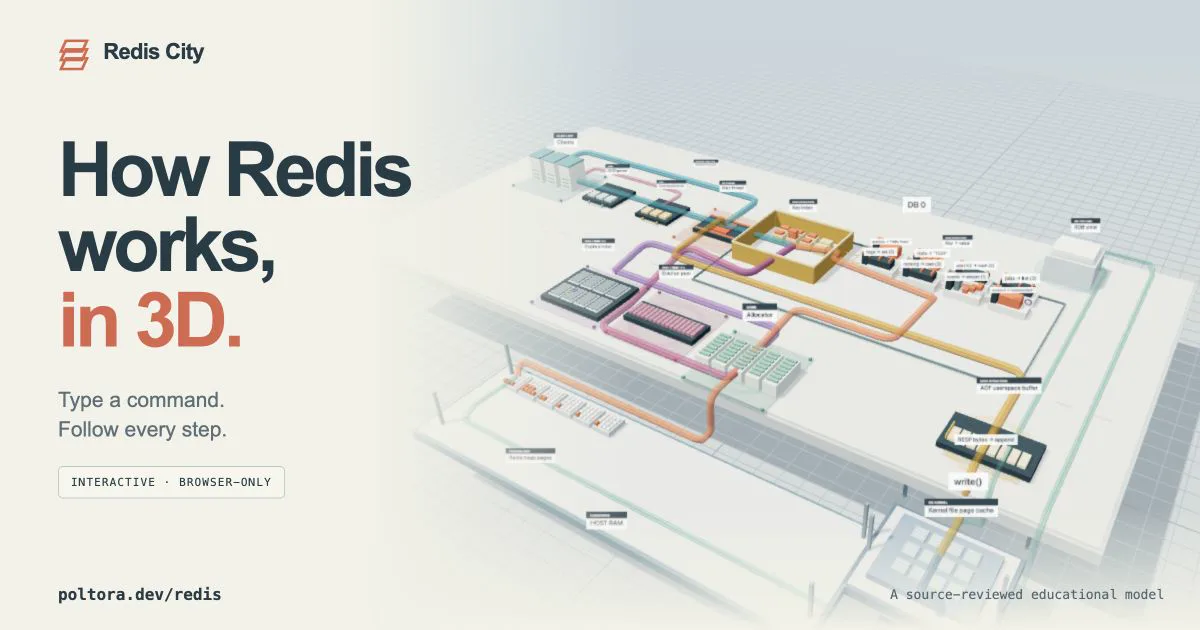
Inspired by a project that built an interactive map of Postgres internals (I wrote about it here), I decided to create a similar map for Redis: poltora.dev/redis.
This isn't just a static diagram. You can navigate the map, open the built-in console, run commands, and watch them execute step by step: from the socket and RESP parser to key lookup, memory allocation, response construction, and AOF or RDB writes.
What exactly the map shows
At the center is a model of a single Redis instance. A command starts at the client, enters the connection buffer, gets parsed by the RESP parser, passes command validation, and executes on the main thread. The map then separately shows how Redis works with the keyspace, the object and its in-memory representation, the client response queue, and, for mutating commands, the data's path into AOF.
The model currently supports the main operations for strings, hashes, lists, sets, sorted sets, and streams. For example, you can run SET, GET, DEL, HSET, HGETALL, LPUSH, LRANGE, SADD, ZRANGE, XADD, EXPIRE, TTL, MEMORY USAGE, and BGSAVE. The full list is available by running HELP in the built-in console.
Several scenarios come with ready-made experiments. They let you compare short and long strings, see a data structure switch its internal encoding, track TTL expiration, create maxmemory pressure, run BGSAVE, and observe copy-on-write when the parent process modifies data while a snapshot is being created.
Where the model came from
The map is based on an analysis of the Redis 8.10.1 source code. The path of a regular command was reconstructed from networking.c, server.c, db.c, kvstore.c, dict.c, and the implementations of the individual data types. For AOF, I separately traced the path from the server.aof_buf buffer through the system write() call into the kernel's page cache and then to persistent storage. For RDB, the map shows a separate BGSAVE process that initially shares physical memory pages with its parent and then gets its own pages on write thanks to copy-on-write.
That's why the map deliberately has no fictional “shared command queue” or separate service for every step. Each client has its own input buffer and list of prepared commands, but command execution converges on the main thread. A regular GET reads an object from memory and never touches AOF, RDB, or disk.
Memory isn't just the size of the value
One of the project's goals is to show why payload size and the Redis process's memory usage aren't the same thing. The model separates useful data, the allocator request, size class, allocator pages, process-resident memory, and the kernel's file page cache.
Deleting a key frees its slot, but doesn't necessarily return the physical page to the operating system immediately. Multiple objects can share a single allocator page, and that page remains resident as long as it still contains occupied regions. So after DEL, the logical data size drops immediately, while RSS may remain unchanged. The memory cleanup experiment shows this behavior separately.
What is simplified
Redis City is an educational model, not a running Redis binary, a jemalloc emulator, or a profiler. UTF-8 string lengths are calculated, but object overhead, size classes, page placement, and operation durations are approximations. The baseline RSS is an assumption and does not measure the visitor's computer memory.
The visual layout of the blocks isn't a physical address map either. It shows the relationships between subsystems. For example, the upper layer with objects is a semantic representation of the keyspace, the lower layer models resident pages, and the AOF and RDB page cache belongs to the OS kernel, not the Redis process heap.
Cluster, replication, Sentinel, Lua/functions, Pub/Sub, transactions, and modules aren't part of the model yet. That's a deliberate limitation: if every subsystem were shown at once, the regular SET or GET path would become impossible to follow.
How it runs
The simulator runs entirely in the browser. It doesn't connect to a live Redis instance, ask for a password, or modify anything on a server. The command model is written in TypeScript, the scene is generated procedurally with Three.js, and the build is published as static HTML, CSS, and JavaScript. In production, the map itself doesn't need a separate Node.js process, Redis instance, or database.
A command is evaluated once, after which the interface presents the result as a sequence of checkpoints: DB, allocation, TTL, journal, and durability. Replaying the animation restores the state from before the command and does not execute it a second time.
How to try it
Open Redis City, expand Console, and start with a simple scenario:
SET city "Hello Redis"
GET city
DEL city
Then try SET temporary hello EX 6, track the TTL, and run GET temporary after the simulated time expires. For a more advanced scenario, start BGSAVE and modify an existing key while the snapshot is being created—the map will show which page was split off through copy-on-write.
The project is still a model, so its main goal isn't to provide precise performance numbers, but to make Redis's invisible transitions observable and separate its actual behavior from common simplifications.